


Edit page content
To edit page content in CMS
- Look for the
 button. Throughout the entire CMS interface, the button indicates that content element is editable.
 - For content, you may often click on the text of the content or the header of the content as a shortcut.
Edit a page
To edit a page in CMS (such as to create a new name or change the page type)
- Right-click the page in the page tree
- Select Edit
Change page type
An occasion to change a page type may be when a page previously contained content but will now be a link to an external URL or vise-versa. To change the page type, begin to edit the page as normal
- Right-click the page in the Page tree and select Edit
- Select the desired page type from the Type: select menu
- Accept that the record will save by clicking OK
- Enter page details as applicable to the page type
- Save and publish the page as usual
Change page name
To change the Pagetitle, Navigation title, or Speaking URL path segment fields, simply enter a new value into the relevant field.
After the change is published, you must clear branch cache for other pages to link to the page using the new URL.
Open and recently used documents
A list of current and recently-used contents are available to facilitate quickly finding items you need to edit. This tool displays the number of currently-open documents (these items appear in the Pagetree as "the user <you> began to edit content on this page N minutes ago" until you close them).
To open a recent or current item,
- Click the
 button
 - Select an element from the list to jump to the selected item
Do not select an item from the recently used list unless you have saved your current work in progress. CMS does not auto-save work. Save early and save often.
To close a current item,
- Click the button
- Click the
 button to close the selected item
Page Tree Filter
If the page you wish to edit is not in the list of recently used documents, the Page Tree filter may help you locate a page.
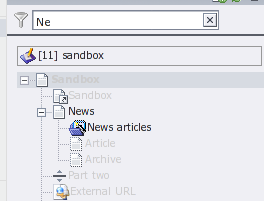
To use, click the filter button and then type part of a page title in the input field. The page tree will highlight pages matching your query as you type, as shown below.
Page tree indicators
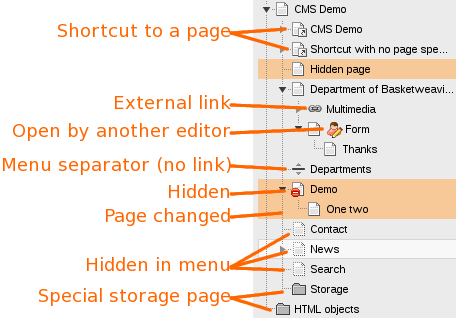
The colors/symbols used in the Pagetree carry significance. Specifically,
- Orange background indicates the page (not the page content) differs from the LIVE (published) version.
- A "person" with a pencil indicates that the page or one of its content elements is currently opened by another CMS editor. Click the person button to see who is editing the record and when they opened it.