


Disk quota exceded
Errors: 1: Disk quota exceded by 79 KBytes !
Cause: The file storage quota has been exceeded or would be exceeded if this file were uploaded.
Solution: Delete files from Filelist to free disk space.
The requested page didn't have a proper connection to the tree-root!
Cause: The most frequent cause of this error is creating a shortcut page without defining the shortcut target.
Solution:
- Edit the page properties of the shortcut page
- On the shortcut tab, select a specific destination page using the page browser or choose a shortcut mode. Only one or the other is required, not both
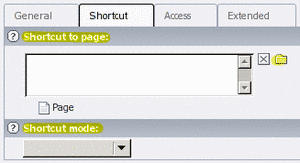
Details: A shortcut page is like a 'quick link' shortcut to another page in the CMS page tree. Without a target, TYPO3 is unable to identify what page should be displayed when the shortcut is selected. Either a specific page or a shortcut method (that allows a page to be selected dynamically, depending on the available pages) must be configured for the shortcut to work.
The requested page didn't have a proper connection to the tree-root! (2nd option)
Error!
The requested page didn't have a proper connection to the tree-root!
(Broken rootline)
Cause: A page was renamed, making its path change.
For example, the page was previously selected as "ABC" but now that it's called "XYZ," "ABC" doesn't exist so it's not connected to its parent page.
Solution: Re-select the page you just renamed from the page tree. Unless re-selecting the page from the page tree doesn't fix the problem, the error can be ignored. If the problem continues, check the most common source of this error.
Error. Page not found.
Cause: Varies. May include multiple pages with the same name, logging into the wrong CMS login URL, not using https for preview, not publishing changes, or stale content cache.
Symptoms: one of the following:
The page is published and you've cleared cache but "page not found" still displays. There is more than one page with the same name and the page you expect to see isn't the first in the pagetree. Often this happens when authors create a spacer page with the same name as a regular page
Solution: In CMS, resolve the name/URL conflict by making the page names unique
Details: Resolve the conflict by
a) Edit the first page (sometimes a menu spacer page) to have a different, unique, Pagetitle;
b) Edit the second page to have a different, unique, Pagetitle;
c) Set a Speaking URL path segment for the second page other the default URL segment; or
d) Delete/disable the page that isn't neededPublish the change as usual.
After resolving the conflict, you should also clear branch cache.
The page has not been published and you are attempting to reach it at its published location instead of its preview location. The two are differentiated by their URL (http vs. https , respectively)
Solution: In TYPO3, use the View module and then select the appropriate page from the pagetree
Details: TYPO3 will not display a preview unless you use the secure (https) communication. By default your browser auto-completes URLs typed like www.ndsu.edu with http:// (insecure) and the preview is not activated. Using the View module applies the correct protocol
You are using the View module and have selected a page from the pagetree, but the preview still doesn't work
Solution: Verify that you have logged into TYPO3 CMS using the correct login URL shown on the CMS home page
Details: Most NDSU sites log in at http://workspaces.ndsu.edu/typo3 , but you should verify with the list on the CMS home page. Note that if you author multiple sites having different URLs, you may need to log in to the site AND switch workspaces in order to author content and preview it
The page name, Navigation Title, or Speaking URL Path Segment have been updated, and you are attempting to view the change by typing the new URL into your Web browser's address bar before the change is published
Solution: Same as (1), above. Use the View module to preview the page
Details: Same as (1), above.
The page name, Navigation Title, or Speaking URL Path Segment have been updated and the change was published
Solution: Clear branch cache
Details: Due to page caching by TYPO3 CMS, pages may already be stored using the old URL. Clearing the cache forces the pages to regenerate using the new URL
Could not be edited in offline workspace
 1: Could not be edited in offline workspace in the branch where found (failure state: 'Online record was not in versionized branch!'). Auto-creation of version not allowed in workspace!
Cause: A CMS bug (see bug report)
Solution: Until CMS is updated to include a patch, you must modify the content element using a different approach.
Page - Click the page icon from the Pagetree and choose Edit page properties. Then set the hide/unhide option and save as usual.
Content element - Click the edit pencil for the content element. Then set the hide/unhide option on the General tab and save as usual.
No workspaces found
Error: You are unable to see any workspaces or modules after successfully logging in to TYPO3
Cause: An author has a login to CMS but has not been added to any groups
Solution: If not already requested, contact a manager for the site you plan to author. She must add you to her group before you will see any CMS modules or pages.
Details: NDSU CMS service
If you log into the CMS backend (authoring environment) and do not see any modules/workspaces or an 'ERROR: No workspaces found!' message appears, you are not a member of any group(s) in CMS and do not have permission to access any workspaces.
Workspace managers are responsible to maintain the list of persons who can contribute content in their workspace. You must contact a manager for the page you plan to author. Once she has added you to the group, you will see CMS modules and pages from her workspace.
Use the access responsibly, as the workspace manager can also revoke your access to her group at any time.
No thumb generated!
In the backend Filelist, if you see a thumbnail that says  instead of a preview of the first page of the PDF it is because the PDF is not properly formatted as a PDF file. Most likely the PDF was created by "printing" it instead of using a proper PDF generator to create a tagged PDF.
The error is innocuous as far as TYPO3 is concerned, but it does indicate the PDF is probably not accessible. You should fix the PDF and re-upload it.
Note that PDFs that do not show this error thumbnail are not necessarily accessible.
Warning: CMS improper reference image #
This is a warning that a file located on the CMS server was pasted into the rich text editor by copy-and-paste, not using the image insert dialog feature within the RTE.
Because the image was inserted not using the Insert/modify image button, no relationship was recorded in TYPO3. If someone deletes that image, they won't be warned they are about to break your page. If the image is deleted, it would no longer display in your page and you won't be able to undo the delete.
Otherwise, this warning is purely informational.
Warning: References ndsu.edu image #
This is a warning that a file located on a known NDSU server was pasted into the rich text editor by copy-and-paste.
Because the image is located on an non-CMS server, no relationship was recorded in TYPO3. If someone deletes that image from that server, it will no longer display in your page.
Otherwise, this warning is purely informational.
Warning: References external host! image #
This is a warning that a file located on a non-NDSU server was pasted into the rich text editor by copy-and-paste.
Because the image is located on an external server, no relationship was recorded in TYPO3. If someone deletes that image from that server, it will no longer display in your page.
Some servers block images inserted using this method (but you might not notice it unless you clear your browser cache and reload the page to see if the image is still present).
You should probably gain permission from the owner of that server before including images located on external servers. Obtaining permission is good Web etiquette. If you have copyright permission to serve a copy of the image and you want to store a copy in CMS to avoid the risk of the image file being deleted, you can save the file and upload it to CMS Filelist and insert the image as usual.
Otherwise, this warning is purely informational.
Can't see and/or click the close, save, save + close buttons
Have you inserted several images into the RTE that were not referenced from your Filelist storage? This is a known problem, and the only work-around is to click the page from the pagetree again and continue editing until the next page save.
You should also inspect the images in the content element to be sure you actually need them included in your page. Contents copy-pasted from old Web sources often include "spacer" images that you can just delete from the RTE.
Unable to submit mailform in workspace preview
Error: POST requests are incompatible with keyword preview
Cause: Mailforms cannot be used in workspace previews. The form will display, but a person using the workspace preview to look at the form will not be able to submit the form.
This restriction is in place to increase security.
Solution: A possible workaround is to
- Edit the page that contains the form and set it to hidden in menu
- Publish the page, the form, and the jump-to page
- Send a link to the page to the person with whom you want to share the form
NDSU Admin (permission management) codes
In addition to human-readable errors that include a possible solution for the workspace managers to follow, errors are reported using codes formatted as CMS-Admin-## to assist with connecting errors to their source. A summary of known/possible errors is listed below. Note that several of these errors should not be possible if the manager is using the CMS interface.
Number | Problem description | Method |
|---|---|---|
CMS-Admin-01 | Did not update database with deleted manager due to an SQL error. | tx_ndsusiteadmin_module1::deleteManager |
CMS-Admin-02 | User does not have access to add or delete managers/publishers/authors, only current workspace managers may change workspace membership rights | tx_ndsusiteadmin_module1::deleteManager |
CMS-Admin-03 | Did not update database with deleted publisher due to an SQL error. Try again and report the problem if it persists | tx_ndsusiteadmin_module1::deletePublisher |
CMS-Admin-04 | Indicates an attempt to delete one's self as an author, which is not allowed because it would remove access to perform management functions | tx_ndsusiteadmin_module1::deleteAuthor |
CMS-Admin-05 | No results were returned for group membership, either the author has no groups (possibly double-clicked the delete button?) or there was an SQL error. Refresh the membership list (re-click the NDSU Admin module from the module list) to see if the member is still listed | tx_ndsusiteadmin_module1::deleteAuthor |
CMS-Admin-06 | Did not update database with deleted author due to an SQL error. | tx_ndsusiteadmin_module1::deleteAuthor |
CMS-Admin-07 | Not used | |
CMS-Admin-08 | An SQL error occurred while querying the author's group membership. | tx_ndsusiteadmin_module1::addAuthor |
CMS-Admin-09 | User error, the author is already an author in the workspace | tx_ndsusiteadmin_module1::addAuthor |
CMS-Admin-10 | User error, the query for authors returned too many results. Try again with a complete campus email address. | tx_ndsusiteadmin_module1::addAuthor |
CMS-Admin-11 | User error, the query for authors returned no results. Does the author have CMS service? If not, they should request the CMS service | tx_ndsusiteadmin_module1::addAuthor |
CMS-Admin-12 | Failed to sync the publisher list from the site “owners” field to the “reviewers” field. Publishing functionality is not affected, but workspace notifications (if enabled) might not work as expected. | tx_ndsusiteadmin_module1::syncPublishers |
CMS-Admin-13 | An SQL error occurred while adding the manager. | tx_ndsusiteadmin_module1::addManager |
CMS-Admin-14 | User error, the manager is already a manager in the workspace | tx_ndsusiteadmin_module1::addManager |
CMS-Admin-15 | User error, the query for managers returned too many results. Try again with a complete campus email address. | tx_ndsusiteadmin_module1::addManager |
CMS-Admin-16 | User error, the query for managers returned no results. Does the author have CMS service? If not, they should request the CMS service | tx_ndsusiteadmin_module1::addManager |
CMS-Admin-17 | Maximum number of publishers (10) has been reached. A publisher must be deleted before another may be added. | tx_ndsusiteadmin_module1::addPublisher |
CMS-Admin-18 | An SQL error occurred while adding the publisher | tx_ndsusiteadmin_module1::addPublisher |
CMS-Admin-19 | User error, the publisher is already a publisher in the workspace | tx_ndsusiteadmin_module1::addPublisher |
CMS-Admin-20 | User error, the query for publishers returned too many results. Try again with a complete campus email address. | tx_ndsusiteadmin_module1::addPublisher |
CMS-Admin-21 | User error, the query for publishers returned no results. Does the author have CMS service? If not, they should request the CMS service | tx_ndsusiteadmin_module1::addPublisher |
CMS-Admin-22 | Security error, an attempt was made to hand-modify the permissions not using normal CMS interfaces | tx_ndsusiteadmin_module1::main |
CMS-Admin-23 | Unable to bind to the named LDAP host | tx_ndsusiteadmin_module1::getLDAPentry |
CMS-Admin-24 | LDAP connection succeeded but LDAP search query failed | tx_ndsusiteadmin_module1::getLDAPentry |