


NDSU Search + CMS
NDSU Search uses Google Custom Search. There is no special behaviorf or CMS pages as compared to any other page under www.ndsu.edu.
Availability to search engines
Any page or content that is published can be accessed by search engines regardless of whether the department page is live.
You should verify that no published content in your workspace contains information that is confidential or inappropriate. This includes pages with dummy content (like "this page/site is under construction"), public announcements that are not ready for distribution, or drafts of documents that require some sort of approval by the state or other governing entity.
The easiest way to keep work in progress from the eyes of search engines is to NOT publish it. Leave work in progress in the editing stage until it is ready for the public.
Another option for avoiding indexing
If it is not possible to leave the page unpublished, you should hide the page or any unpolished page content before publishing it.
Flag pages with "do not search"
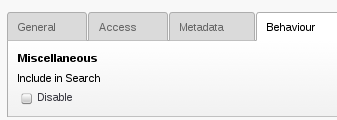
On occasion, there will be pages that you do not want appear in search results, such as "thank you" receipts to web forms. You can set a "flag" in the page to request search engines do not include that page in their index/search results. Google honors this flag, however other search engines might not.
To set the "do not search" flag,
- Edit the page properties for the page that should not appear in search results
- On the Behavior tab, check the Include in Search Disable checkbox
- Save and publish the page as usual
Valid assumptions:
- A page with "Do not search" set will be excluded from Google's search index if it's set when Google crawls the page
- Anyone who discovers the address of the page can view the contents of the page
INVALID assumptions:
- Enabling this flag on a page that's already in Google's search index will immediately remove the page. (Reality - enabling this flag means eventually the page will be excluded from search indexes that honor the flag)
- Enabling this flag on a page means it's OK for the page to contain sensitive information. (Reality - this flag IS NOT a security measure. You should not put sensitive information in NDSU web pages, period. Please contact the IT Security team if you have questions about approved methods for sharing sensitive information with a business need)
Behavior of "Last updated"
The Last update field value in Page Properties (Metadata tab) will be affect the display value of the Last updated date in the footer of the page.
The Last update field value will not be used for purposes of determining the actual last updated date for search engines. This is because a page should be re-indexed if it is modified, even if you choose to override the in-page last-updated display.