


Use the CMS News system
News must be enabled before you can use it on your site. You may include news as part of your new site request or, if you want to add news to an existing site, please contact us and we can enable it for you. Don't forget to tell us your site name/address!
Create a news article
- Locate the news articles container under the News page in a folder called Articles

- Right-click the Articles page and select New record
- In the New record frame, click News
- If you do not have the option "News," it is because you do not have sufficient permissions to author News or the News application is not installed for your site
- Complete the news record fields as appropriate
(learn detailed information about all of the news article fields)- Enter the news title in the Header field
- Enter teaser text in the Teaser field
- Enter article body text in the Text field (rich text editor as normal)
- Save and close the news element, publishing as normal
Shortcut method
The shortcut method only works if a news record already exists in the news repository you are modifying.
- Using the Page module, click the Articles page in the Page tree
- Scroll to the bottom of the work area and locate the news list, as shown
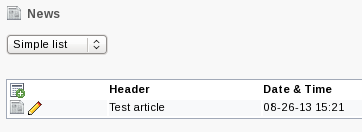
1. List of news items in the CMS backend - Click the
 button
 - Complete the news record fields as described above
Preview news articles
To preview (draft) news articles, you should
- Save and close the news article content record
- Preview the News page (the page that contains the Articles folder)
- From the list of news articles in the page preview, click the article you want to preview
Insert news list on home page
By default, the news list displays only on the news page, e.g. www.ndsu.edu/yoursite/news/. If you want a list of recent articles or headlines to display on the home page,
- Insert a record from the HTML Objects folder in the Pagetree
- Suggested for use in the Border column
- The News Headlines (5) record will insert a list of five (5) most recent, non-archived, news headlines
- The Latest News (3) record will insert a list with short previews of the three (3) most recent, non-archived, news articles
A preview of this list type (with a content frame) is available on the CMS home page
- Suggested for use in the Normal column
- The Latest News (5) record will insert a list with short previews of the five (5) most recent, non-archived, news articles
- The News List (10) record will insert a list with short previews of the ten (10) most recent, non-archived news articles
- Suggested for use in the Border column
Subscribe to the news feed
An RSS feed is automatically created. Learn more about your department's RSS feed.
 Next steps