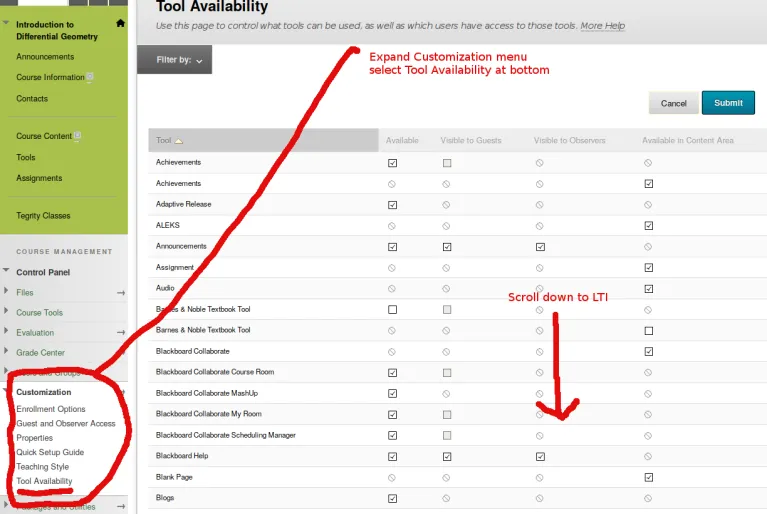
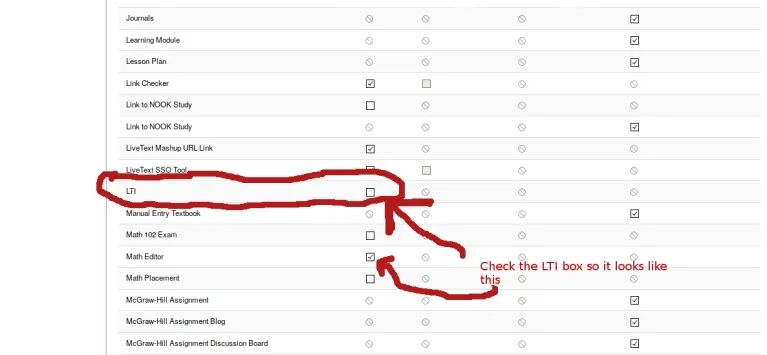
Mathematics Home Programs Programs Menu Major & Minor Doctoral & Master's Computer Science & Mathematics Mathematics & Physics Mathematics & Statistics Mathematics Education Back to level 1 For Students For Students Menu Undergraduate Undergraduate Menu Requirements Graduate Graduate Menu Applying for Graduate School Seminars and Colloquium Qualifying Examinations Alumni Math Club Math Emporium Scholarships Back to level 1 Research Research Menu Algebra & Discrete Mathematics Analysis Applied Mathematics Geometry & Topology Conferences Seminars and Colloquium Seminars and Colloquium Menu Algebra & Discrete Mathematics Seminar Analysis and Geometry Seminar Applied Mathematics Seminar Graduate Colloquium Back to level 1 About About Menu People People Menu Faculty Lecturers Administrative Staff Graduate Students Professors Emeriti Giving Back to level 1 Outreach Outreach Menu Mathematics Genealogy Project Sonia Kovalevsky Day Sonia Kovalevsky Day Menu History Organizers Reimbursement Directions Speakers Schedule Tri-College Math Contest Talent Search Back to level 1 Resources Resources Menu Faculty Instructors Graduate Students Links Back to level 1 Employment Employment Menu Emporium Assistant Grader Back to level 1 Contact Enable LTI in Blackboard Enable LTI in Blackboard On the left under 'Customization' click on 'Tool Availability'. Scroll down and make sure the box in the LTI row (in the 'Available' column) is checked. (Click on image to expand.)