Class Schedule, Class Rosters, Grade Rosters
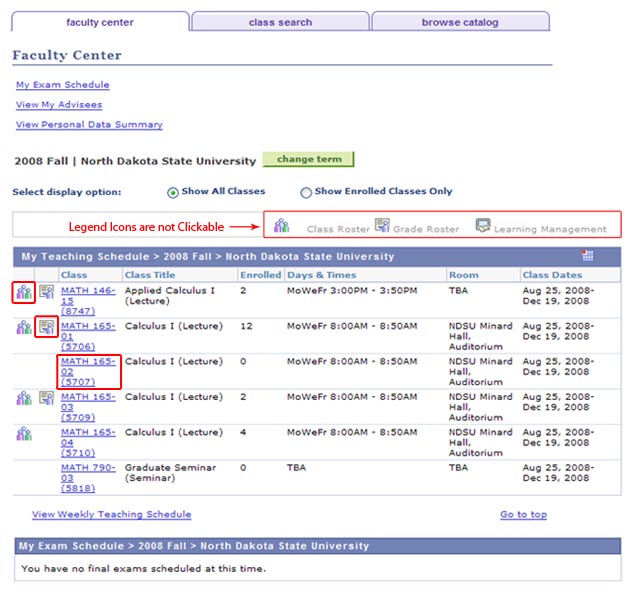
- Click on Faculty Center tile and choose either: My Schedule, Class Roster, or Grade Roster
- A listing courses will appear
- Class Roster — Click on the Class Roster icon (three students) to the left of the course link to view students enrolled in the class
- Grade Roster — Click on the Grade Roster icon (pointing instructor) to the left of the course link to access the grade roster for the class (when available)
- Course Details — Click on the class link for additional course details, description, enrollment requirements, class notes, etc.
Wait List Rosters
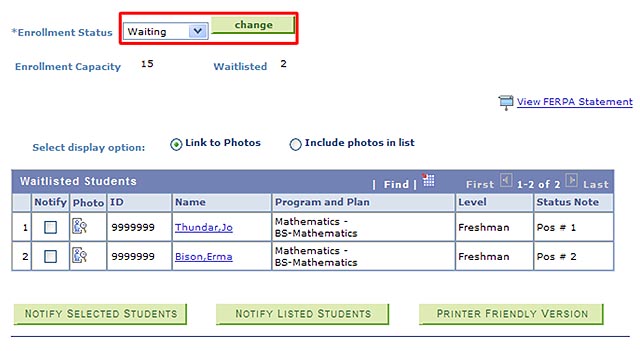
To view students on a wait list for a class section, click on the class link and then change the Enrollment Status field from 'Enrolled' to 'Waiting'. Click the green [Change] button. Wait listed students, along with their wait list position will be displayed.