Verification
Verification is the comparison of the Free Application for Federal Student Aid (FAFSA) information with Internal Revenue Service (IRS) data, required forms, and additional documentation. Verification is a process of ensuring the information you entered on the FAFSA is correct. If you are selected for verification by the Department of Education or NDSU, you must complete the verification process if you are interested in receiving federal, state, and some types of institutional financial aid. You may be asked to verify information such as income, federal income tax paid, household size, status as a dependent or independent student, citizenship, etc.
If you have been selected for verification, NDSU will send a request for required documentation to your NDSU e-mail account. The list of required documents is in the To Do list, under the Tasks tile, on Campus Connection and updates on the status of your documents.
Example: Verification Worksheet (Dependent Student) - Received

Navigating your Financial Aid Verification to-do list
- Log into Campus Connection
- NOTE: You must complete the NDSU New Student Setup to activate your User ID, or you will be unable to log into Campus Connection. Follow the step-by-step instructions to activate your Campus Connection User ID. The normal format for this ID is firstname.lastname. If you are unsure whether or not you have claimed your User ID, check through the Have I Claimed My Account page.
- If you have previously attended another North Dakota University System (NDUS) institution you may already have an existing Campus Connection User ID. Please continue using this existing User ID to access Campus Connection at NDSU.
- If you experience problems or have questions about your System ID, please call the N.D. University System Help Desk at 866-546-3358 or submit a Help Desk ticket: helpdesk.ndus.edu
- Click on the "Tasks" tile
- Click on the "To Do List" on the left side bar.
- This will give you a complete list of all the items you need to complete.
- Click on an item in the list to see a detailed description of what is required.
Obtaining Required Verification Information (FAQ)
A tax return transcript shows most line items from your Federal tax return as it was originally filed.
- Visit https://www.irs.gov
- Click "Get your tax record"
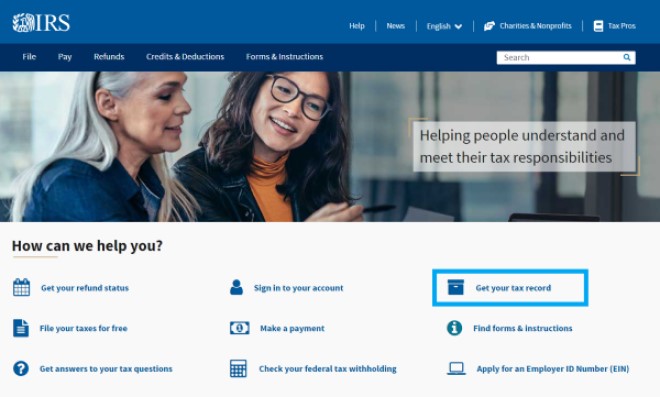
- Under the "Request online" header, click [Get transcript online] button
- If you already have an existing account, click the [Sign in with ID.me] button
- If you don’t already have an account, click the [ID.me Create an account] button and create a new account
- Once account is created, sign in
- Select a reason you need a transcript → Income Verification
- Leave "Customer File Number" blank
- Click "Go"
- Under "Return Transcript" select tax year 2022 (if you are completing verification process for 2024-2025) or 2021 (if you are completing verification process for 2023-2024. NOTE: We are unable to use the Account Transcript for Verification purposes.
A W2 statement is a standard tax form showing the total wages paid to an employee and the taxes withheld during the calendar year. It is prepared by an employer for each employee.
Where can I obtain a copy?
A copy of your W2 form can be obtained from your employer. You can also obtain your Wage and Income Transcript directly from the IRS.
- Visit https://www.irs.gov
- Click "Get your tax record"
- Under the "Request online" header, click [Get transcript online] button
- If you already have an existing account, click the [Sign in with ID.me] button
- If you don’t already have an account, click the [ID.me Create an account] button and create a new account
- Once account is created, sign in
- Select a reason you need a transcript → Income Verification
- Leave "Customer File Number" blank
- Click "Go"
- Under "Wage and Income Transcript" select tax year 2022 (if you are completing verification process for 2024-2025) or 2021 (if you are completing verification process for 2023-2024.